Zum Inhalt springen

Kurz vor dem Verzweifeln! Artikel wollen einfach nicht in den Warenkorb

Erstellt am 24. Juni 2010 · 4 Antworten · letzte Antwort am 25. Juni 2010

Tags: Frage

Ftdesigner ·

Hallo Leuts,(Especially Flink)

Ich dreh hier gleich noch durch.
Und wie ich gelesen und recherchiert habe, bin ich nicht der einzige.

Ich habe es geschaft, dass die Artikel den Produkten zugeordnet werden, aber nun habe ich das problem, dass die Produkte einfach nicht in den Warenkorb gehen wollen.
Es kommt mir vor, als würden die Artikel dann nicht mehr in den Warenkorb gelegt werden, wenn die Selectbox Varianten angegeben hat. Ist die Selectbox leer, dann wird einfach der erste zugeordnete Artikel aus der Datenbank genommen.

Versteh nichts mehr, wäre echt froh, wenn ihr mir helfen könntet.

Grüße

Ftdesigner

Tevsa ·

Moin :-),

Kontollier mal:
sind alles PID's gesetzt (gerade die zum Warenkorb)?

ist plugin.tt_products.useArticles=1 gesetzt?

sind die Varianten beim Anlegen mit ; getrennt?

Haben die Artikel eine Preis?

Die Artikel sind einem Produktzugeordnet?

LG
Tevsa

Ftdesigner ·

Morgen Tevsa,
Vielen Dank für deine Antwort.

Also: Hier halt mal meine Constants

#### CONSTANTS ####

# Seiten IDs in Konstanten auslagern
id_shoproot = 84
id_shopdetail = 84
id_shopwarenkorb = 86
id_shopkontrolle = 87
id_shopabschliessen = 88
id_shopagb = 89

# Sysfolder IDs
id_shopsysprodukte = 55
id_shopsyskategorien = 56

############
### PIDs ###
############

# Sysfolder mit den Produkten #
plugin.tt_products.pid_list = {$id_shopsysprodukte}

# Rootseite des Shops
plugin.tt_products.PIDstoreRoot = {$id_shoproot}

# Seiten ID für Listenansicht
plugin.tt_products.PIDlistDisplay = {$id_shopkategorien}

# Seiten ID für Warenkorbabsicht
plugin.tt_products.PIDbasket = {$id_shopwarenkorb}

# Seiten ID für Einzelansicht
plugin.tt_products.PIDitemDisplay = {$id_shopdetail}

# Seiten ID für Kontrolle und Bezahlung
plugin.tt_products.PIDpayment = {$id_shopkontrolle}

# Seiten ID für Bestellung abschließen
plugin.tt_products.PIDfinalize = {$id_shopabschliessen}

# Seiten ID für AGB
plugin.tt_products.PIDagb = {$id_shopagb}

# AGB im selben Fenster öffnen
plugin.tt_products.AGBtarget = _parent

# Seiten ID für Suche
plugin.tt_products.PIDsearch = {$id_shopsuche}
...

...
#Artikel benutzen
plugin.tt_products.useArticles = 1
...

Ich weiss ja nicht, aber hab ich denn noch was vergessen?
Ich glaubs auf jedenfall nicht.
useArticles habe ich auch mal im Setup eingebunden.
Nichts gebracht.
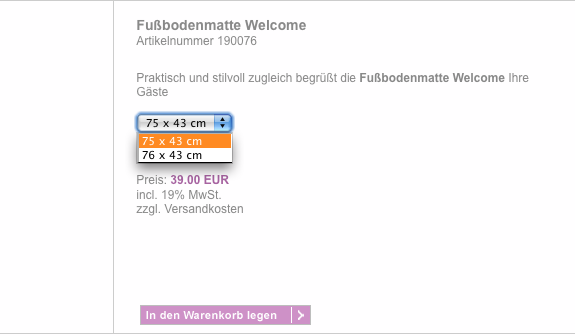
Artikel haben auch ein Preis, die Varianten sind mit ";" getrennt. (Die Dropdownbox ist ja auch sichtbar die einzelnen Produkte sind auswählbar
Schau im angehängten Bild.
Die Artikel sind auch dem Produkt zugeordnet.

Was mich auch verwirrt, ist, dass wenn ich eine Dropdownbox auswähle, in der nichts steht, der erste Artikel, von den zugeordneten, in den Warenkorb gelegt wird. Aber nur der 1. und wenn ich dann die Dropdownbox im Template abändere damit was drin steht, werden die Artikel richtig übernommen.
Das macht doch alles kein Sinn!(Wahrscheinlich versteht man das gar nicht, was ich hier schreibe. Diese Sätze verwirren mich noch mehr als tt_products)

Weitere Ideen?

Freu mich auf ne Antwort.

Grüße
Ftdesigner

Bild-1.png

Ftdesigner ·

Nochmals Hallo,

Also ich begebe mich nun total in das Element tt_products.
Mann muss die Dropdownbox in die marker <!--- ###display_variant'Zahl'### ---> setzten.
Aber auch wenn ich das mache, werden noch immer keine Produkte in den Warenkorb gelegt.
Ich habe ein paar neue Felder erstellt, vielleicht ist das auch noch wichtig zu erwähnen.
Wie kann ich den neuen Feldern ne Zahl zuordnen wie color die nr. 1 hat?

Ich dachte im setup.txt->

 table.tt_products = tt_products
  table.tt_products {
    itemnumber = itemnumber
    variant {
      2 = size
      3 = description
      4 = gradings
      5 = additional
      8 = size2
      9 = size3
      10 = material
      11 = quality
	  12 = stoffsize
	  13 = length
	  14 = length2
	  15 = length3
  	  16 = height
  	  17 = height2
  	  18 = height3
  	  19 = breadth
  	  20 = breadth2
  	  21 = breadth3
  	  22 = depth
  	  23 = depth2
  	  24 = depth3
  	  25 = diameter
  	  26 = diameter2
  	  27 = diameter3
  	  28 = carelabel
  	  29 = color1
  	  30 = color2
  	  31 = color3
  	  32 = color4
  	  33 = katalognr
  	  34 = supplier
  	  35 = supplienr
    }
  }

  conf.tt_products.ALL {
    orderBy = title
    requiredFields = uid,pid,category,price,price2,tax,inStock,datasheet
  	language.type = table
  	language.table = tt_products_language
    controlFields {
		newItemDays = starttime
    }
	fieldLink {
			datasheet = <a href="uploads/tx_ttproducts/datasheet/###PRODUCT_DATASHEET###">|</a>
	}
  }

  conf.tt_products.LIST {
	field {
		note = TEXT
		note.postUserFunc = tx_pmkhtmlcrop->htmlCrop
		note.postUserFunc.htmlCrop = 9 | ... More
	}
  }

  table.tt_products_articles = tt_products_articles
  table.tt_products_articles {
    itemnumber = itemnumber
    variant {
      1 = color1
      2 = size
      3 = description
      4 = gradings
      5 = additional
      6 = color2
      7 = color3
      8 = size2
      9 = size3
      10 = material
      11 = quality
      12 = stoffsize
    }
  }

und im constants.txt->

   # cat=plugin.products//; type=boolean; label= Color selectable, List display: Make the color selectable in the list
  selectColor = 1
    # cat=plugin.products//; type=boolean; label= 2nd Color selectable, List display: Make the 2nd color selectable in the list
  selectColor2 = 1
    # cat=plugin.products//; type=boolean; label= 3rd Color selectable, List display: Make the 3rd color selectable in the list
  selectColor3 = 1
    # cat=plugin.products//; type=boolean; label= Size selectable, List display: Make the size selectable in the list
  selectSize = 1
    # cat=plugin.products//; type=boolean; label= Stoffsize selectable, List display: Make the size selectable in the list
  selectStoffsize = 1
    # cat=plugin.products//; type=boolean; label= 2nd Size selectable, List display: Make the 2nd size selectable in the list
  selectSize2 = 1
    # cat=plugin.products//; type=boolean; label= 3rd Size selectable, List display: Make the 3rd size selectable in the list
  selectSize3 = 1
    # cat=plugin.products//; type=boolean; label= Description selectable, List display: Make the description selectable in the list
  selectDescription = 1
    # cat=plugin.products//; type=boolean; label= Gradings selectable, List display: Make the gradings selectable in the list
  selectGradings = 1
    # cat=plugin.products//; type=boolean; label= Material selectable, List display: Make the material selectable in the list
  selectMaterial = 1
    # cat=plugin.products//; type=boolean; label= Quality selectable, List display: Make the quality selectable in the list
  selectQuality = 1
Ftdesigner ·

Hallo Leute,

Ich bin weiter gekommen mit der Fehleranalyse:

Und zwar hängt es mit der tca.php datei zusammen.

Wenn ich da neue Felder einfüge, also in dem Array-> "'columns' => Array ("
dann gehen die Varianten der Artikel nicht mehr.

Weiss jemand, wo ich die Arrays sonst noch vermerken muss?

Hier mal der Schnipsel:

$TCA['tt_products'] = Array (
	'ctrl' => $TCA['tt_products']['ctrl'],
	'interface' => Array (
		'showRecordFieldList' => 'hidden, starttime, endtime, fe_group, title, subtitle, related_uid, itemnumber, ean, price, price2, note, note2, note_uid, category, address, inStock, tax, weight, bulkily, offer, highlight, directcost, size, stoffsize, length, length2, length3, height, height2, height3, breadth, breadth2, breadth3, depth, depth2, depth3, diameter, diameter2, diameter3, carelabel, color1, color2, color3, color4, description, gradings, material, katalognr, supplier, supplienr, additional, unit, unit_factor, imgattribute, www, datasheet, special_preparation, image, hidden, sellstarttime, sellendtime, shipping, shipping2, handling'
	),
	'columns' => Array (
		'hidden' => Array (
			'exclude' => 1,
			'label' => 'LLL:EXT:lang/locallang_general.php:LGL.hidden',
			'config' => Array (
				'type' => 'check'
			)
		),
		'starttime' => Array (
			'exclude' => 1,
			'label' => 'LLL:EXT:lang/locallang_general.php:LGL.starttime',
			'config' => Array (
				'type' => 'input',
				'size' => '8',
				'max' => '20',
				'eval' => 'date',
				'checkbox' => '0',
				'default' => '0'
			)
		),
		...		
		---------------------------!!!Hier ist das Problem!!!---------------------------
		'eigenesFeld' => Array (
			'exclude' => 1,
			'label' => 'LLL:EXT:lang/locallang_general.php:LGL.eigenesFeld',
			'config' => Array (
				'type' => 'input',
				'size' => '8',
				'max' => '20',
				'eval' => 'date',
				'checkbox' => '0',
				'default' => '0'
			)
		),		
...

Für jede idee und hilfe bin ich extrem Dankbar

Grüße

Ftdesigner