Alle möglichen Feldtypen sind vermutlich hier gelistet:
http://docs.typo3.org/neos/TYPO3NeosDocumentation/IntegratorGuide/CustomContentElements.html
Leider gibt es derzeit (Neos 1.1) noch keine Textarea.
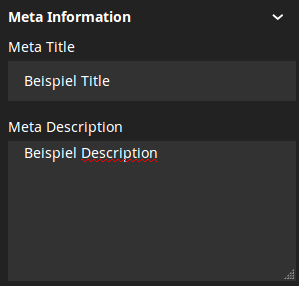
Mal kurz ins Blaue geschossen (vielleicht gibt es ja noch nachfolgende Hinweise, wie man das JavaScript schöner einbinden kann). Im Anhang sieht man ein Beispiel wie das im Backend aussehen kann.
NodeTypes.yaml:
'TYPO3.Neos.NodeTypes:Page':
  childNodes:
    teaser: []
  ui:
    inspector:
      groups:
        'meta':
          label: 'Meta Information'
  properties:
    'metaTitle':
      type: string
      defaultValue: 'abc'
      ui:
        label: 'Meta Title'
        inspector:
          group: 'meta'
    'metaDescription':
      type: string
      defaultValue: 'xyz'
      ui:
        label: 'Meta Description'
        inspector:
          group: 'meta'
          editor: '../../Vendor.Site/JavaScript/Content/Inspector/Editors/TextAreaEditor'
Site.Vendor/Resources/Public/JavaScript/Content/Inspector/Editors/TextAreaEditor.js:
define(
[
	'emberjs'
],
function(Ember) {
	Ember.TextSupport.reopen({
		attributeBindings: ['name', 'required', 'pattern', 'step', 'min', 'max']
	});

	return Ember.TextArea.extend({
		classNames: ['neos-in2code-input'],
		validators: {}
	});
});
Beispiel CSS (lässt sich sicher mit SASS auch schöner machen):
.neos .neos-in2code-input {
  background-color: #323232;
  border: 2px solid #323232;
  box-shadow: none;
  box-sizing: border-box;
  color: white;
  font-family: 'Noto Sans',sans-serif;
  font-size: 14px;
  height: 140px;
  margin: 0;
  min-width: 288px;
  padding: 0 14px;
  transition: none 0s ease 0s ;
  width: 100%;
  line-height: 20px;
}
Cheers