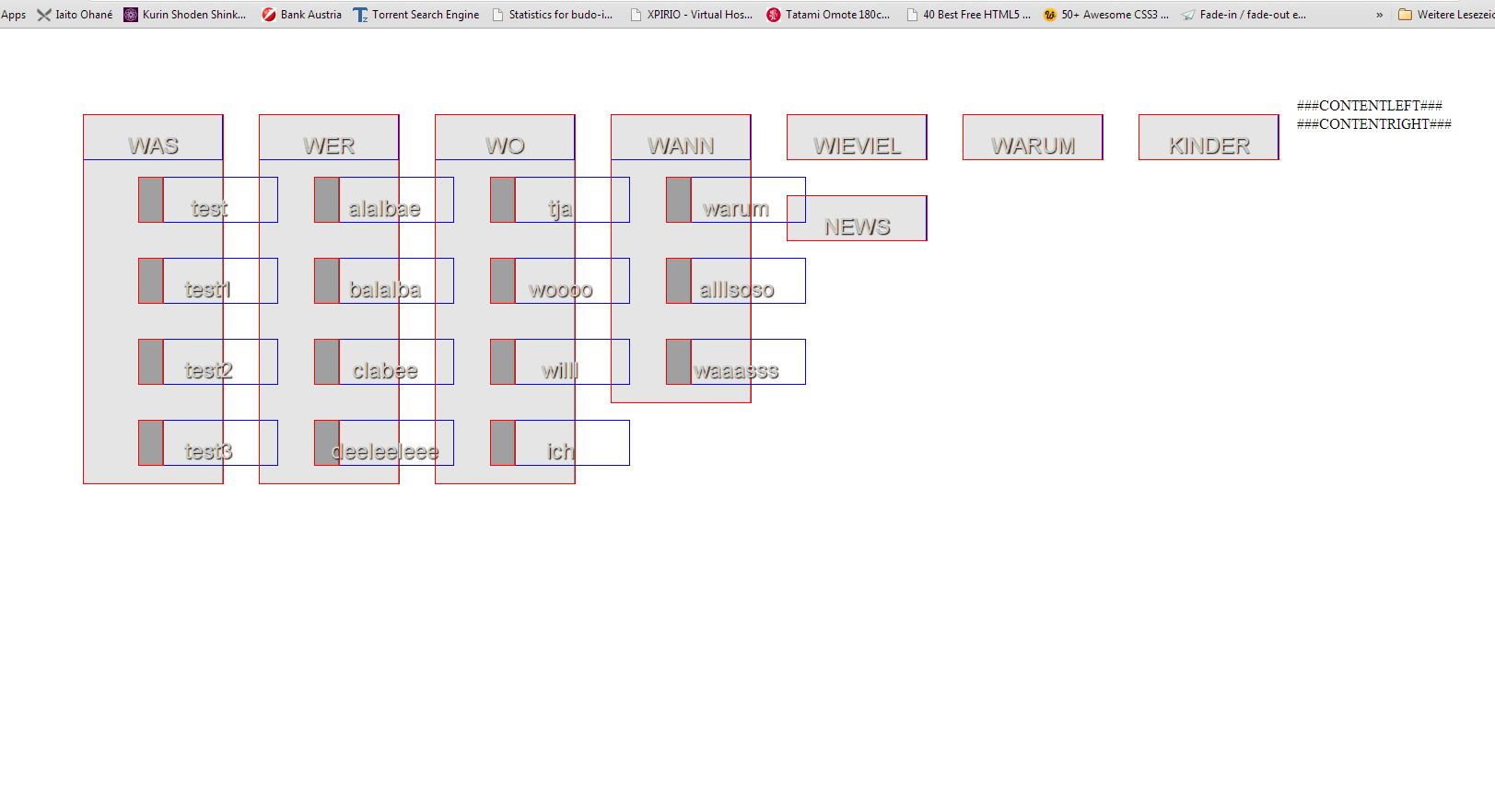
OK Leute ich bekomme das nicht ganz gebacken und verstehe es nicht.
Zuerst ein normales Menü zwei Ebenen:
lib.menu = HMENU
lib.menu {
  1 = TMENU
  1.noBlur =1
  1.expAll =1
  1.wrap = <ul>|</ul>
  1.NO = 1
  1.NO {
    expAll = 1
   wrapItemAndSub = <li>|</li>
  }

  2 < .1

}
Soweit so gut.
Dann ein bisschen html gerüst
<body>
###BODY###


     <div id="menu">  <!-- das hauptmenü -->
     <!--  -->
     ###MENU###


     </div>


<div id="page">
    <div id="contentleft">###CONTENTLEFT###</div>
    <div id="contentright">###CONTENTRIGHT###</div>


    </div>

</div> <!-- end page -->


###BODY###
</body>
dann das CSS
body {
	padding: 50px;
	background-color:#fff;

}
ul{list-style: none;}

#menu {

   top: 0px;
   margin:0;
   padding:0;
   width:50%
   height: 1px;
   font-family:Arial, Helvetica, sans-serif;
   text-shadow: 1px 1px 1px black;
   border-bottom: 1 px solid rgba(0,0,0,0.3);
   background: rgba(0,0,0,0.5);
   box-shadow: inset 0 -1px 0 0 rgba(255,255,255,0.3),inset 0 -10px 0 0 rgba(255,255,255,0.25), inset 0 -20px 20px rgba(255,255,255,0.25), inset 0 -15px 30px rgba(0,0,0,0.3);

}


#menu ul li{
outline: 1px solid red;
   width: 150px;
   text-align:center;
   position:relative;
   float:left;
	border-right: 1px solid rgba(0,0,0,0.4);
	background: rgba(0,0,0,0.1);
	margin: 20px;
}


#menu ul li a{
	outline:1px solid blue;
	font-size: 1.5em;
	padding-top: 20px;
	display:block;
	width:150px;
	height:40px%;
	color: #cccccc;
	text-decoration:none;


}


#menu ul li ul li{
	clear:both;
	magin-top: 25px;
	width: 25px;

	color: #ffffff;
	text-decoration:none;
	background: rgba(0,0,0,0.3);

}
und rauskommt das:
die ul vom submenu sind so inneinander verschachtelt, dass ich keine separate Bearbeitung mit css machen kann, dmait ich via "Display:" die unterebene einblenden kann.
Es macht mir immer die gesamte ebene 1 auf.
Ich blick nicht durch was ich versemmel.
bitte bitte um hilfe.
Besten dank